As mandatory filing through the Ministry of Commerce Qayd platform draws closer, accountants have moved on from asking “what is Qayd?” to a more practical question: how do I prepare my company’s financial statements, step by step, so they are ready to submit? This guide answers exactly that, taking you from reviewing the chart of accounts to the final check, all from inside The One System. If you are looking for an introduction to the platform and its timeline, start with our guide to the Ministry of Commerce Qayd system in Kuwait, then come back here.
Before you begin: what you need
Preparing financial statements for the Qayd platform in Kuwait is not a one-sitting task; it is a small project with inputs, owners and deadlines. Before you open the software, make sure you have the following in place:
A clear owner for the file
One person who follows the file from start to finish, even if several accountants or an external audit firm are involved.
A closed, or nearly closed, financial year
Work on final or near-final figures, after adjusting entries, stock-count entries and asset depreciation have been recorded.
An up-to-date chart of accounts
A chart that reflects what the company actually does, without temporary accounts whose balances have been left hanging for years.
Controlled permissions
Decide who may change accounts, mappings or entries during the preparation period, to avoid undocumented changes.
Having these in place gets you halfway there, because most delays in preparation do not come from the difficulty of the electronic format but from unreconciled balances or accounts nobody can explain.
Which documents are usually required?
Requirements on the Ministry of Commerce Qayd platform vary by company type and category, and the ministry itself is the authority that sets them. Before starting, however, companies usually gather a set of documents and data, chiefly:
- The financial statements approved by the auditor for the financial year concerned
- The closing trial balance after adjusting and closing entries
- The previous year’s financial statements, for the comparative figures
- The company’s basic details, such as trade name, registration number, activity, and the start and end dates of the financial year
- The notes to the financial statements as they appear in the approved report
- The auditor’s details and the date of the audit report
This list is for guidance only and is not an official list. Please refer to the Ministry of Commerce and Industry website, moci.gov.kw, and the instructions published on the platform to confirm the documents your company actually needs before you submit financial statements.
Review the chart of accounts
The chart of accounts is the foundation for every later step: if it is tidy, mapping is quick; if it is cluttered, the effort doubles. Carry out the review in this order:
- Extract the full chart with balancesDisplay the accounts at every level with each account’s year-end balance, so you see the whole picture before changing anything.
- Sort the accounts into three groupsActive accounts with movements and balances, accounts with no movements during the year, and temporary or suspense accounts whose balance should be zero at period end.
- Deal with suspense accounts firstAny balance left in a suspense or clearing account needs an adjusting entry that moves it to its correct account before closing.
- Check where each account sitsMake sure every account falls under the right group: current or non-current asset, short-term or long-term liability, operating or other income.
- Split what needs splittingIf a single account combines items that are presented separately in the statements, it is better to divide it into sub-accounts than to rely on manual analysis every year.
It helps at this stage that The One System uses a multi-level chart of accounts and supports cost centres and multiple branches. This means you can keep branch or department detail through cost centres, instead of creating a separate account for each branch that weighs down the chart and complicates mapping later.
A practical tip: do not delete an account that has movements in previous years, even if it is no longer used. Deactivate it instead and transfer any remaining balance, because the accounting history must stay traceable when comparing years.
Map to the taxonomy
Once the chart is clean comes mapping, that is, identifying the matching element in the ministry’s approved taxonomy for each account or group of accounts. We will not re-explain the taxonomy concept here, as we covered it in detail in What is XBRL?; instead we focus on how to do it.
The first rule is that mapping is usually “many to one”: several internal accounts are grouped under a single element. Cash box and various bank accounts, for example, are usually mapped to one element representing cash and cash equivalents, while their detail stays in the software for internal use.
The second rule is that one account is never mapped to two elements. If you find an account that could fit two different elements, that is a sign it combines different items and needs splitting in the chart of accounts, which takes you back to the previous step.
| Common situation | How to handle it |
|---|---|
| Several bank accounts in different currencies | Map them to the same element, making sure foreign balances are translated into the local currency at the closing date |
| A provision or accumulated depreciation account | Map it to its own element rather than merging it with the asset, because it is presented differently |
| An account combining operating and non-operating income | Split it in the chart of accounts first, then map each part to its element |
| A new account added during the year | Map it as soon as it is created, so it does not appear unmapped at period end |
| A current account for a partner or related party | Review it with the accountant or auditor to choose the right element based on the nature of the balance |
Document every mapping decision that is not obvious in a short note: why was this account mapped to this element? This record saves a great deal of time the following year and makes the file understandable to any new accountant or to the auditor.
On this point specifically, The One System is preparing a mechanism within its system to map the chart of accounts to the appropriate element in the taxonomy, while the company keeps its internal chart of accounts as it is, so mapping becomes an extra layer on top of the chart rather than a replacement for it.
Prepare the financial statements
Once the chart is organised and mapping is complete, preparing XBRL financial statements becomes an orderly extraction of recorded data rather than retyping it. Follow this sequence:
- Record year-end entriesDepreciation, accruals and prepayments, inventory adjustments after the stock count, currency differences, and any entries the auditor requests.
- Review the trial balanceMake sure it balances and that there are no unjustified balances on the wrong side, such as a credit balance in a cash account.
- Extract the balance sheet and income statementDirectly from the software, then compare the figures line by line with the statements approved by the auditor.
- Prepare the comparative figuresPrior-year figures must match what was previously approved, or any change to them must be documented and justified.
- Gather the required notesSome information does not come from balances alone, such as accounting policies or contingent liabilities, so it is prepared from the approved report.
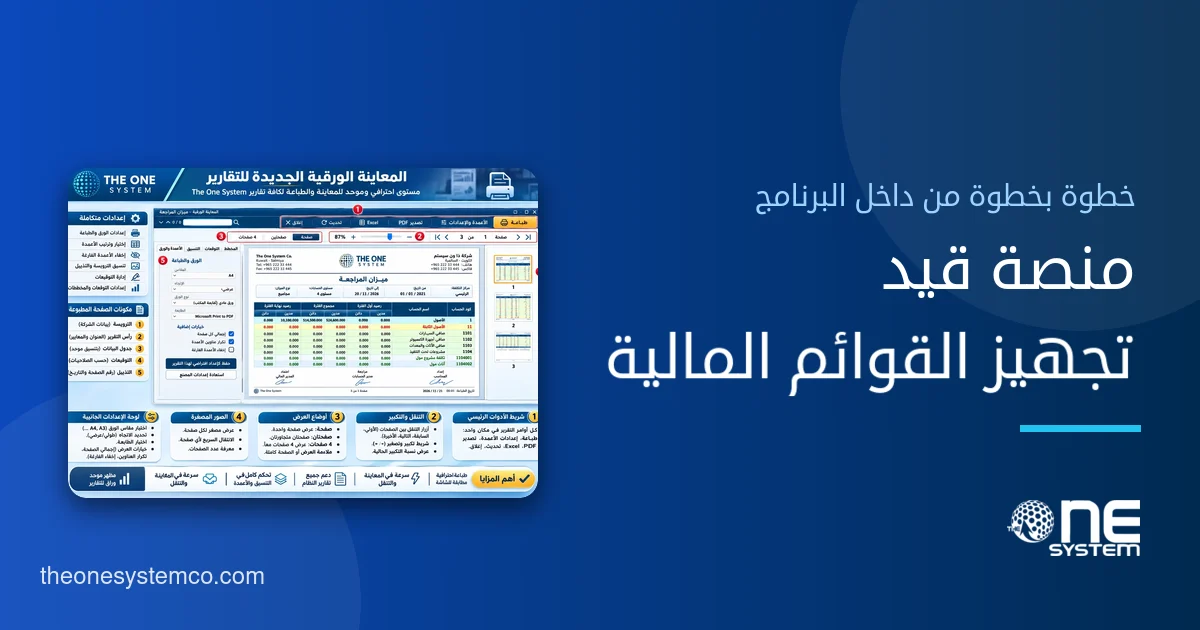
The accounting module in the software provides journal entries, the general ledger, the trial balance, account balances and final accounts, as well as the balance sheet and income statement, all from a single database. So you do not need to move figures into external spreadsheets, and any difference you find between a statement and the approved version can be traced back to the entry that caused it.
It is important to distinguish between the internal statements management uses day to day and the statements submitted to the regulator. The former may be more detailed; the latter follow the structure of the approved taxonomy. Good mapping is what lets you produce both from the same data without duplicating work.
Want to see how your chart of accounts is organised in the software?
Book a free demo of the general accounting software, and our team in Kuwait will show you how accounts, cost centres and financial reports are organised, using data close to your own business.
Review before submission
The final review is the last chance to catch an error before it reaches the regulator. We recommend it is carried out by someone other than the person who prepared the mapping, and that it covers the following areas:
Complete mapping
No account with a year-end balance is left unmapped to a taxonomy element.
Matching totals
Total assets equal total liabilities and equity, and net profit in the income statement matches its effect on equity.
Agreement with the approved statements
Every figure in the electronic statements matches the corresponding figure in the statements signed by the auditor.
Periods and currency
The financial year’s start and end dates are correct, and the currency and units are set as the platform requires.
Company details
Name, registration number and activity match the official register, with no differences in spelling.
Change log
Every change made to accounts or mappings during preparation has a known source and has been approved.
The One System is working to include tools in the system that help users review the required data and spot gaps before preparing the electronic reports, so you reach the submission stage confident that the file is complete. The submission procedure itself follows the official instructions published on the Ministry of Commerce Qayd platform.
If a comment comes back after submission, do not fix it by changing the figure in the electronic file alone; go back to its source in the software, whether an entry, an account or a mapping. That way, what is in the system stays consistent with what was submitted, and the same comment does not recur the following year. Keep a copy of the submitted file and of the trial balance it was built on, as they are your reference for any later query from the regulator or the auditor.
A suggested work plan for preparing the file
No single timeframe suits every company, but spreading the work over several weeks stops it piling up in the final days. This is an indicative breakdown that can be adjusted to the size of the company:
| Stage | Main tasks | Suggested owner |
|---|---|---|
| Week 1 | Gather documents, appoint the file owner and set permissions | Finance manager |
| Week 2 | Review the chart of accounts and clear suspense accounts | Chief accountant |
| Week 3 | Map to the taxonomy and document decisions | Accountant, in coordination with the auditor |
| Week 4 | Prepare the statements and reconcile them with the approved statements | Chief accountant |
| Week 5 | Final review, then submission according to the platform’s instructions | Second reviewer, then the file owner |
In the first year, review and mapping take the longest. In later years the effort drops considerably, because the mapping is saved and only new accounts need to be added.
Practical mistakes that delay submitting financial statements
Given the nature of accounting work, these are the most common reasons the file may be delayed or sent back for correction:
- Starting the mapping before the chart of accounts has been cleaned up
- Changing entries in a closed year after the statements are approved without informing the auditor
- Preparing figures in external spreadsheets and then entering them manually, creating differences that are hard to trace
- Neglecting the comparative figures and focusing only on the current year
- Inconsistent spelling of company details across different documents
- Leaving the whole Qayd file to one person without documentation or a second reviewer
What does The One System offer at these stages?
The One System is preparing its accounting platform to support the requirements of the Qayd platform and XBRL, building on an accounting foundation that already exists in its general accounting software:
Multi-level chart of accounts
A flexible structure for organising and grouping accounts in a way that makes mapping easier.
Cost centres and multiple branches
Internal detail for branches and departments without inflating the chart of accounts.
Financial reports from a single source
Trial balance, balance sheet, income statement and final accounts from the same recorded data.
Taxonomy mapping (in preparation)
A mechanism under development to map accounts to the appropriate element in the taxonomy.
User permissions
Control over who can change accounts and entries during the preparation period.
Multi-currency
Track foreign-currency balances and revalue them when preparing the statements.
The company follows the relevant official requirements and updates and develops the system accordingly, so its clients are ready for the coming stages with as little effort as possible.
Questions & answers
FAQ: preparing statements for the Qayd platform
Answers to the questions customers ask most.
01How do I prepare financial statements for the Qayd platform?
Start by reviewing the chart of accounts and clearing suspense accounts, then map the accounts to the approved taxonomy elements, extract the balance sheet and income statement from the software and reconcile them with the statements approved by the auditor, then carry out a final review before submitting according to the platform’s instructions.
02Which documents are required to submit financial statements on the Qayd platform?
Companies usually gather the approved financial statements, the closing trial balance, the previous year’s statements, the company’s basic details and the notes. The official list is set by the Ministry of Commerce and Industry, so we recommend checking its website, moci.gov.kw.
03Must the statements be approved by the auditor before preparation?
You can start organising the chart and mapping before approval, but the final figures submitted must match the approved statements, so it is best to complete the reconciliation once the auditor’s report has been issued.
04Do I need to redo the mapping every year?
No. The mapping is saved in the system and reused in later years; you only need to map new accounts and review any change in the approved taxonomy.
05What should I do if I find a difference between the software’s statements and the approved statements?
Trace the difference to its source: an adjusting entry that was not recorded, an account in the wrong group, or a difference in grouping. Because the data sits in a single source in the software, you can reach the entry that caused it and fix it before submission.
06Does The One System support preparing statements for the Qayd platform?
The One System is preparing its accounting system to support the requirements of the Qayd platform and XBRL, including mapping the chart of accounts to the taxonomy and preparing financial reports in a compatible format, building on the chart of accounts and reports already available in the general accounting software.
Didn’t find your answer? Our team is happy to help.
Related articles and news
News: The One System supports the Ministry of Commerce Qayd system — The One System and XBRL — Guide to accounting software in Kuwait.